Skip to content
SCAN · SORT · STORE

Find out what a grader would see, before you pay for grading.

Photograph a card, get an honest read of what stands out, and sort it into keep or sell in seconds.

Free to use right now. Works in your phone's browser, nothing to install.

A photo check, not a final grade. Your original photos are always kept.

Real app interface · sample data

ONE BUTTONPress Scan.
HOW IT WORKS
1. Scan

Point the camera. The scanner finds the card and captures the original photo, which stays the evidence.

2. Sort

Read what stands out on the card, then swipe it into one of two bins: Keep or Sell.

3. Store

Keep goes to your Vault, where every card holds its photos, its notes, and its batch.

4. Market

Sell turns into a draft listing you review and export yourself. Nothing is ever listed for you, and market context appears only when a licensed source is on.

THE DECISION

Most collectors do the expensive part before the obvious part.

The pile grows, the photos get lost, and the next move turns into guesswork. This usually happens right before you spend money on a grading submission, a listing, or storage. Grade Optic gives every card a next move: keep it or sell it.

BEFORE GRADE OPTIC
  • Camera roll full of card photos
  • A "Maybe review" pile growing every week
  • Sell candidates mixed with keepers
  • Good cards forgotten after the rip
AFTER GRADE OPTIC
  • Every card has a record
  • Every card has a next move
  • Keep bin → Vault
  • Sell bin → Market Prep
PRODUCT PROOF

See exactly what you get.

One card. One report. One clear next action, with original-photo evidence and buyer-first market context kept in their proper lanes.

FICTIONAL SAMPLE · SIMULATED DATA · NOT LIVE OR LICENSED

REPORT PREVIEWGO-SAMPLE-A142 · Mail day sample
Sample card artwork. Display only and not condition evidence.DISPLAY ART · NOT EVIDENCE
IDENTITY · CONFIRMED

Avery North · 2024 Northstar Hoops

Aurora parallel · #142 · raw

Exact card match with front, back, and angled-surface photo records attached. Condition notes and market context stay separate.

● Exact identity● All 3 photos attached● Raw card segment
BUYER SNAPSHOT

The facts that matter first.

Identity, visible concerns, completed-sale context, and the next move in one view.

VISUAL PRECHECK
Strong visible condition
8.2 out of 10 from photos · High confidence
Visual precheck only · not a final grade
COMPLETED-SALE RANGE
USD 30–46
5 accepted observations
LATEST SALE
USD 46
Jul 29, 2026
MAIN UNCERTAINTY
Upper-left corner softness
Judged from photos, not in hand
VISIBLE CONCERNS
  • Right-heavy centering
  • Upper-left corner softness
  • Back-right edge whitening
  • Surface reviewed · clean
MARKET CONTEXTCompleted sales, kept apart from asking prices
MARKET CONTEXT

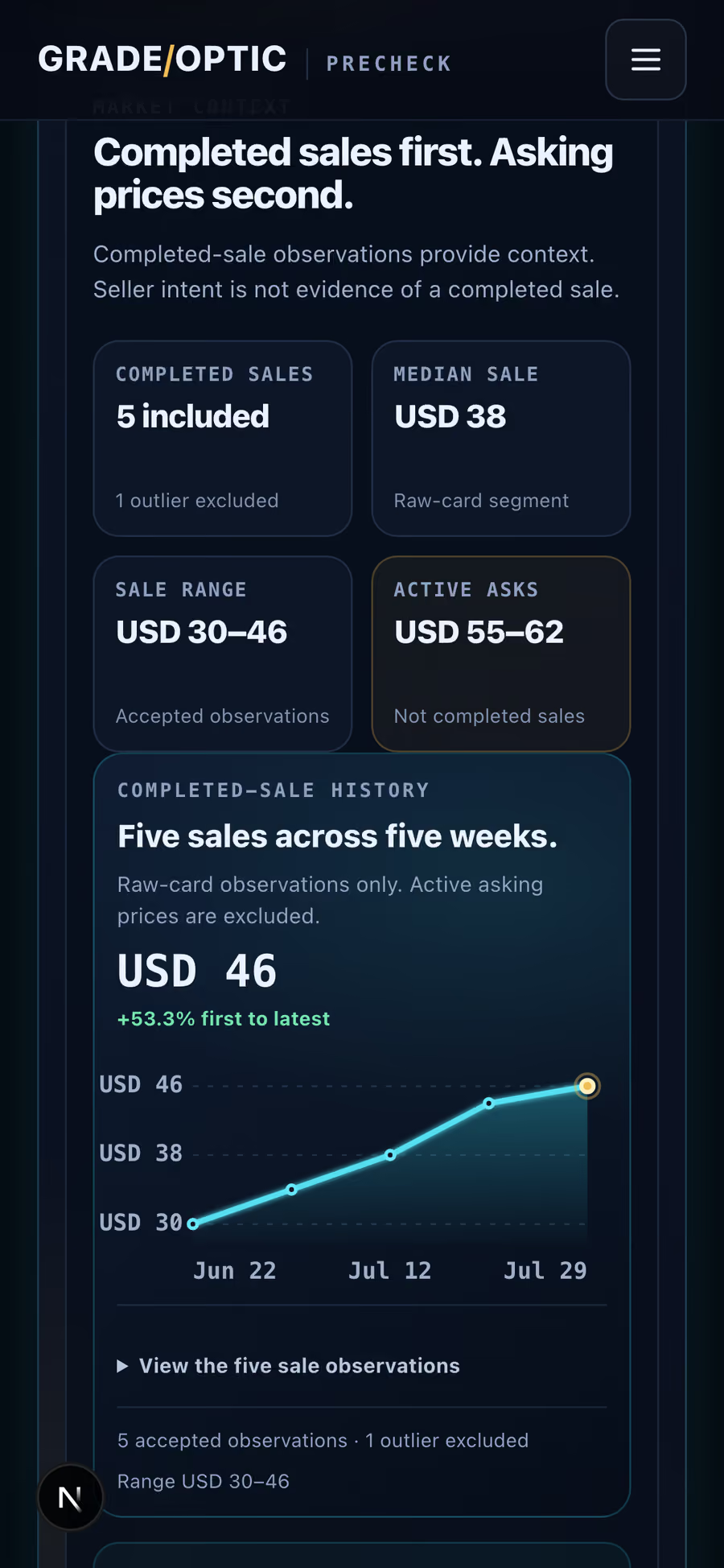
Completed sales first. Asking prices second.

Completed-sale observations provide context. Seller intent is not evidence of a completed sale.

COMPLETED SALES
5 included
1 outlier excluded
MEDIAN SALE
USD 38
Raw-card segment
SALE RANGE
USD 30–46
Accepted observations
ACTIVE ASKS
USD 55–62
Not completed sales
COMPLETED-SALE HISTORY

Five sales across five weeks.

Raw-card observations only. Active asking prices are excluded.

USD 46+53.3% first to latest
Illustrative completed-sale historyFive completed-sale observations rise from USD 30 on 2026-06-22 to USD 46 on 2026-07-29. Active asking prices are excluded.USD 46USD 38USD 30Jun 22Jul 12Jul 29
View the five sale observations
  1. Jun 22USD 30
  2. Jul 2USD 34
  3. Jul 12USD 38
  4. Jul 22USD 44
  5. Jul 29USD 46
5 accepted observations · 1 outlier excludedRange USD 3046
Market data is informational only and not a guaranteed value.Prices vary by condition, timing, platform, fees, and exact card identity.Market context never changes the visual condition read.
CONDITION NOTESWhat the photos show, area by area
CONDITION NOTES

What the photos show.

Each note points back to the photo record that supports it.

Centering
Appears slightly right-heavySource · GO-SR-F01
Corners
Slight softness at upper leftSource · GO-SR-F01
Edges
Light whitening at back rightSource · GO-SR-B01
Surface
Even gloss, no scratch or print line foundSource · GO-SR-S01
PHOTO EVIDENCEView source records3 attached
FRONT · GO-SR-F01

Front record attached

Supports: Centering, Corners

BACK · GO-SR-B01

Back record attached

Supports: Edges

ANGLED SURFACE · GO-SR-S01

Angled surface record attached

Supports: Surface

Original source photos are omitted from this public preview. The card art above is display only and never used as condition evidence.

AFTER THE PHOTO CHECK

Sort into a Keep or Sell bin.

KEEPKeep bin → VaultSELLSell bin → Market Prep
DATA SOURCEFixed demonstration dataset

USD · raw card segment · through Aug 1, 2026

REPORT BOUNDARYVisual precheck, not a final grade

It does not provide official grades, authentication, guaranteed values, or investment advice.

WHAT'S INSIDE

Your entire collection in your pocket.

Instant card recognition

Get a fast proposed match from a clear photo. Add the back when needed and confirm the exact card before you act.

Swipe to sort

Move every recognized card into one of two bins: Keep or Sell.

Find any card in seconds

Find cards by batch, notes, tags, photos, and destination without rebuilding a spreadsheet.

Live card market analytics

When a licensed market source is on, see completed sales, active asking prices, and historical movement, with asking prices never mixed into sold results. Live market data is not connected in the public beta.

SELL WORKFLOW OUTPUT
Marketplace draft exports

Turn reviewed Sell-bin cards into draft CSV exports for eBay and Whatnot. Grade Optic packages card details, safe title and description copy, original-photo references, and source-backed market context when available. You review, complete missing fields, and upload each draft yourself.

eBay draft CSVWhatnot draft CSVReview, complete, then upload yourself. Nothing is auto-listed.
Real export columns · fictional sample rows · price fields ship empty for you to set
WHEN IT WILL NOT ANSWER

The same card, three photos, two refusals.

Grade Optic reads photographs, so it checks the photograph first. Here is one card shot three ways. The clear photo goes through. The other two do not, and the product says so instead of guessing.

The demonstration card photographed clearly, which the photo check accepts.
A clear photoIt reads it
The same card photographed out of focus, which the photo check refuses to read.
Out of focusIt won't guess
The same card smeared by camera shake, which the photo check refuses to read.
Camera shakeIt won't guess
WHAT IT SAYS INSTEAD OF A NUMBER
  • On both photos it would not readQuick Precheck needs a clearer front photo.
  • And it records why, without judging the cardFront photo too unclear to estimate condition.

These are the product's own words, produced by running its own photo check over the three photographs above on 2026-08-07. A blurred photo says nothing about the card itself, which is exactly why the answer is a request for a better photo rather than a score.

HONEST BOUNDARIES

What Grade Optic will not tell you.

A tool you can trust has to be straight about its limits. These are ours, on purpose.

WHAT IT DOES
  • Shows what a grader looks at first: centering, corners, edges, surface
  • Ties every note to the photo it came from, so you can check the call yourself
  • Tells you when a photo cannot support a read, instead of guessing
  • Gives every card one next move: keep it or sell it
  • Keeps completed sales and asking prices in separate columns, never blended
  • Remembers the batch, the notes, and where each card ended up
WHAT IT WILL NOT DO
  • No official grades
  • No authentication
  • No guaranteed values
  • No investment advice
  • No fake comps
  • No grading-company affiliation
AND WHEN IT CANNOT TELL, IT SAYS SO

Any tool can give you a number. These are the words Grade Optic uses instead when the photos do not support one, copied exactly from the product:

  • The photo is too soft or dark to readThe photo was too unclear to read. Retake the front in good light and try again.
  • It cannot estimate condition from what it can seeFront photo too unclear to estimate condition.
  • The analysis returns something it does not trustPrecheck returned an unexpected result and was stopped. Please try again.
YOUR NEXT STACK

Start with the stack on your desk.

Free to use right now. No payment is collected, and no account is needed. Works in your phone's browser, nothing to install.

QR code that opens the Grade Optic scanner at gradeoptic.com/scan/bulk

On a desktop? Point your phone camera here to open the scanner on it, with your stack still in front of you.

Not a final gradeNot authenticationNo guaranteed valuesOriginal-photo evidence preserved